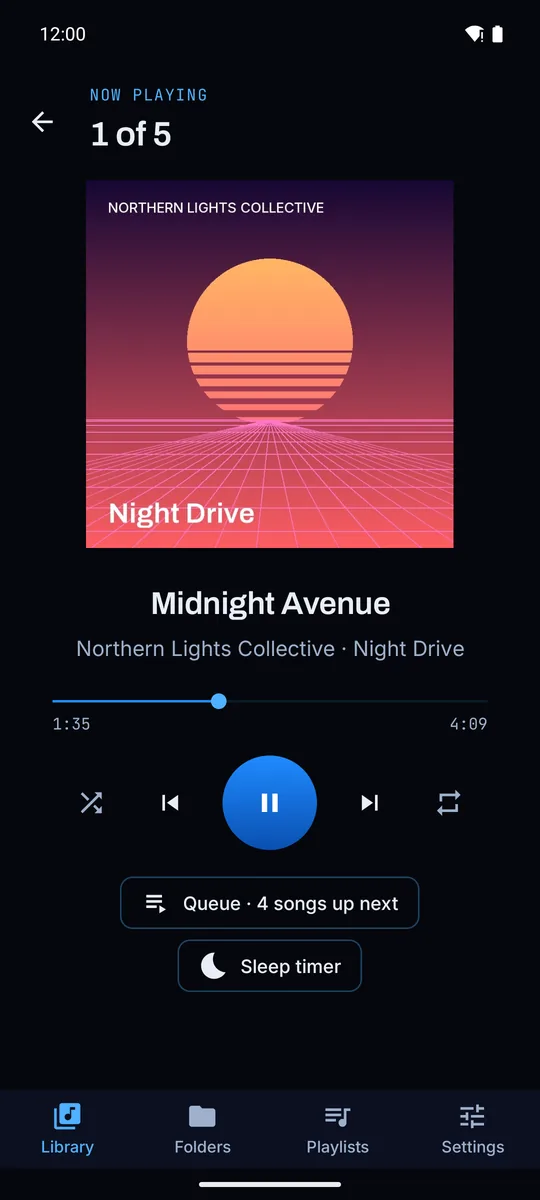
Flex Music Player plays the songs already on your phone and keeps going for hours with the
screen off. It doesn't ask for internet access at all, so there's nothing to show you adverts
and nowhere to send your data.
Android lists every permission an app asks for. Ours doesn't include internet access, so the app
physically can't load adverts, phone home or upload anything. You can check it yourself on the
Play Store page under "App permissions".
0 adverts, trackers or accounts
7.5 MB download
8+ Android version it runs on
Features
Built to keep playing
Most of the work went into the parts you only notice when they fail: the music stopping in your pocket, a playlist losing songs, shuffle repeating itself.
Screen off, phone in your pocket
Plays for hours with the screen locked. Controls sit in the notification, on the lock screen and on Bluetooth and headset buttons: press once to pause, twice for the next song, three times for the previous one.
If the phone closes the app anyway, it remembers the song and the exact spot. Audiobooks and long DJ mixes pick up where you stopped. A built-in helper walks you through the battery settings on Xiaomi, Redmi and POCO phones, which are the strictest about this.
Your library, your way
Songs, albums, artists and a full folder browser. Hide folders you don't want, like voice notes and call recordings, and skip ringtones by setting a minimum length.
Playlists that stay tidy
A song can only be in a playlist once. Drag to reorder, swipe to remove with undo, and import .m3u files from other players.
Shuffle that's random
Every press of shuffle deals a brand-new order. If one artist keeps turning up in clumps, switch on the option that spreads their songs out.
Easy on the battery
Nothing runs while the music is paused. An optional saver mode hands playback to the phone's audio chip with the screen off, on phones that support it, and the equaliser button opens your phone's own sound settings.
Bump gestures
Knock the phone to skip a song
The phone is in your hand, on the desk or in a car mount, and you want the next song without unlocking it. Knock the side twice to jump forward or back, three times to skip a track, or three times on the top edge to pause. Bumping your hand into the edge and tapping the edge against your palm both count.
Gestures are off until you switch them on, and they only listen while music is playing. A pocket check ignores knocks while the phone is in a pocket, so walking doesn't skip songs. Phones differ, so the calibration screen draws every knock as it happens and you set the sensitivity to suit yours.
The motion readings are handled in memory on the phone and never stored.
The artists and albums are made up for the screenshots. Your own music shows up the same way.
Your songs. Every song on the phone, sorted, searchable, with the mini-player at the bottom.Albums. Cover art comes from your own files.Playlists. Your own lists next to Recently added, Most played and Recently played.Reorder. Drag to reorder. Swipe to remove, and undo if you didn't mean it.Folders. Browse the folders on your phone and play or shuffle any of them.Gesture settings. Choose what each knock does and how far a jump goes.
What the app knows about you: nothing
Your library, playlists and play counts are stored inside the app on your phone and go nowhere else. There's no account to make, no analytics and no advertising ID. Uninstall it and every trace is gone.
Made by OrganiCode, a software company in South Africa
Flex Music Player was designed and built by OrganiCode in Vereeniging. It's written in C# on .NET for Android around Google's Media3 audio engine, with about 250 automated tests on the logic that decides what plays next and what gets saved, and it was tested against a library of 10,000 tracks.
No. Flex Music Player plays audio files that are already on your phone or SD card. It has no internet permission, so it can't stream, download or look anything up online.
Which file types does it play?
MP3, AAC and M4A, FLAC, Ogg, Opus and WAV. If your phone can store it and Android can decode it, it should play.
Why does my music stop when the screen goes off?
Some phones, Xiaomi, Redmi and POCO in particular, close background apps to save battery. In the app, open Settings and tap the Keep playing option. It shows you which phone settings to change and runs a five-minute test to check.
What are bump gestures?
An optional way to control music without looking. Knock the side of the phone twice to jump forward or back, three times to skip a track, and three times on the top edge to pause. They're off until you switch them on, and they only listen while music is playing.
Can I bring playlists from another player?
Yes. Import any .m3u or .m3u8 playlist file. Songs are matched to the music on your phone, and anything that can't be found is listed so you know what's missing.
What does it cost?
Nothing. There are no ads, no in-app purchases and no subscription.
Does it work on Xiaomi, Redmi and POCO phones?
Yes. It was built and tested on a Xiaomi phone running HyperOS, which is the strictest about closing apps in the background. The Keep playing helper in Settings opens each battery setting that needs changing and then checks that music survives five minutes with the screen off.
Is it good for audiobooks and long mixes?
Yes. It remembers the exact spot in long tracks, so an audiobook chapter or a two-hour DJ mix picks up where you stopped, even after the phone restarts.
Does it have an equaliser?
The equaliser button opens your phone's own sound settings, so you keep the equaliser and sound effects your phone maker already tuned for its speakers and headphones.
Who makes Flex Music Player?
OrganiCode, a software company in Vereeniging, South Africa. It's written in C# on .NET for Android, around Google's Media3 audio engine.